Free Invoice Generator
Create professional invoices online in seconds with Invico. No signup. No subscription. Your data stays on your device.
- Unlimited invoices
- Free forever
- PDF export
- Works offline
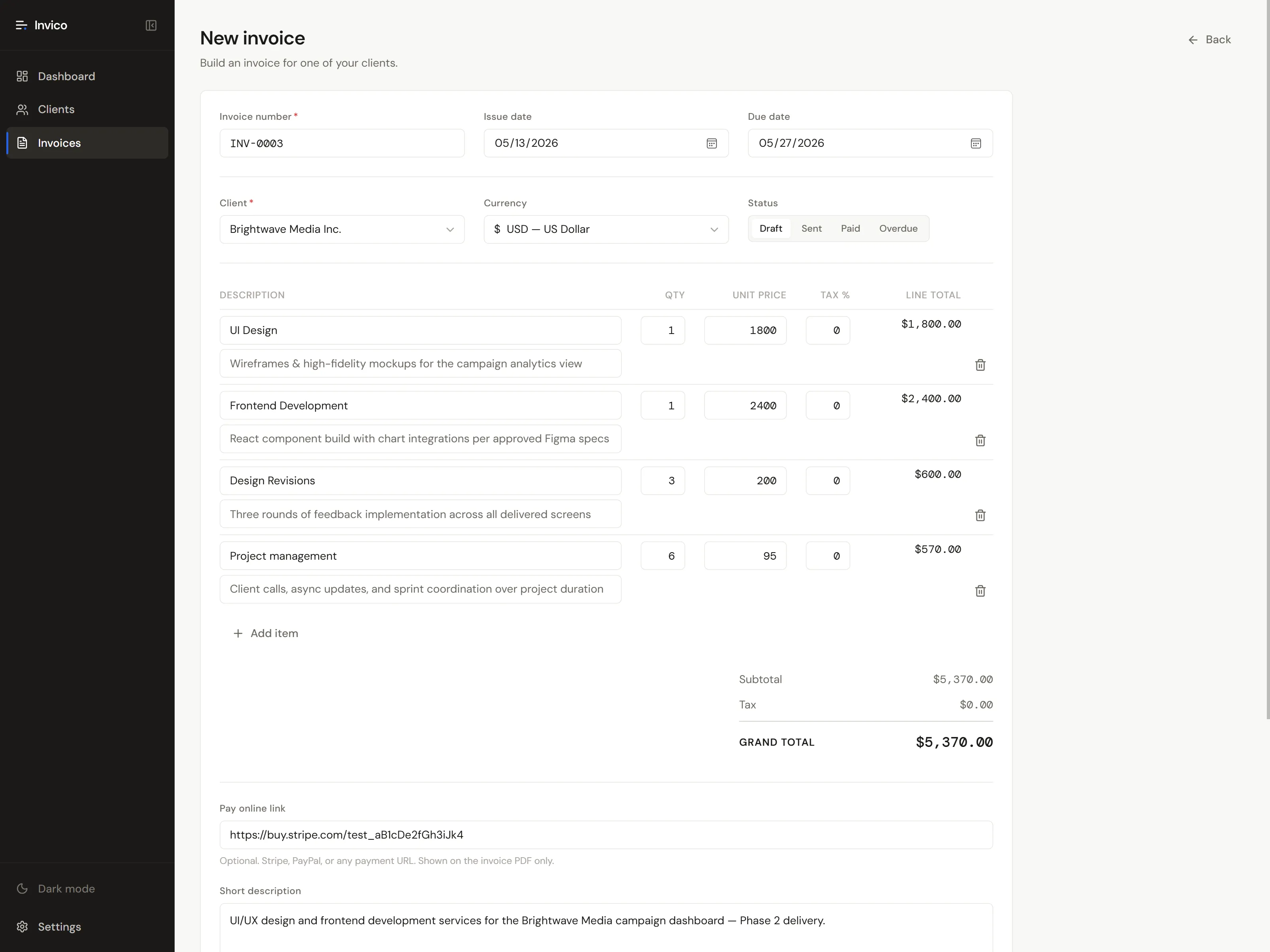
Everything you need to send a professional invoice.
Invico is a focused invoice generator for freelancers and small businesses. No fluff, no upsells, no learning curve. Just the tools you reach for every week, designed to work together.
Invoices
Create and edit invoices with line items, taxes, discounts, and notes. Track every invoice through draft, sent, paid, and overdue stages. Auto-numbering keeps your records tidy from the very first invoice.
Receipts
Mark any invoice as paid and Invico generates a matching PDF receipt for your records. Capture the payment date, amount received, and a custom note so your client always has clean documentation.
Client directory
Save reusable client profiles with company logos, billing addresses, dial codes, and per-client default currencies. Picking a client during invoice creation auto-fills everything you would otherwise retype.
Beautiful PDF export
Every invoice and receipt renders to a print-ready PDF with real selectable text, not flattened images. Send it by email, archive it locally, or print it the same way you would from a desktop accounting app.
Keyboard-first workflow
Press ⌘K to open the command palette, N for a new invoice, ⇧N for a new client, T for theme toggle, / to focus search. Drive the entire app from your keyboard without ever reaching for a menu.
Offline & private
Invico is a Progressive Web App that installs to your home screen and runs without internet. Every invoice, client, and setting lives on your device. Export the entire database to JSON whenever you want a backup.
How it works
Make your first invoice in three steps.
No tutorial required. If you have used any invoice builder tool before, Invico will feel familiar. If you have not, the whole flow takes under a minute the first time and seconds after that.
Open Invico in your browser
Visit Invico, click Open, and you are inside the app. There is no signup, no email confirmation, no onboarding video to skip. Set your business name, logo, and bank details in Settings the first time, and you are ready to invoice.
Add your client and build the invoice
Press N or click New Invoice. Pick a client from your directory or add a new one, then add line items with quantities, prices, and tax rates. Invico calculates the subtotal, tax, and grand total live as you type.
Download the PDF and send it
Click Export PDF to download a print-ready file with selectable text. Email it to your client, archive it locally, or print it. When the client pays, mark the invoice Paid and Invico generates a matching receipt PDF automatically.
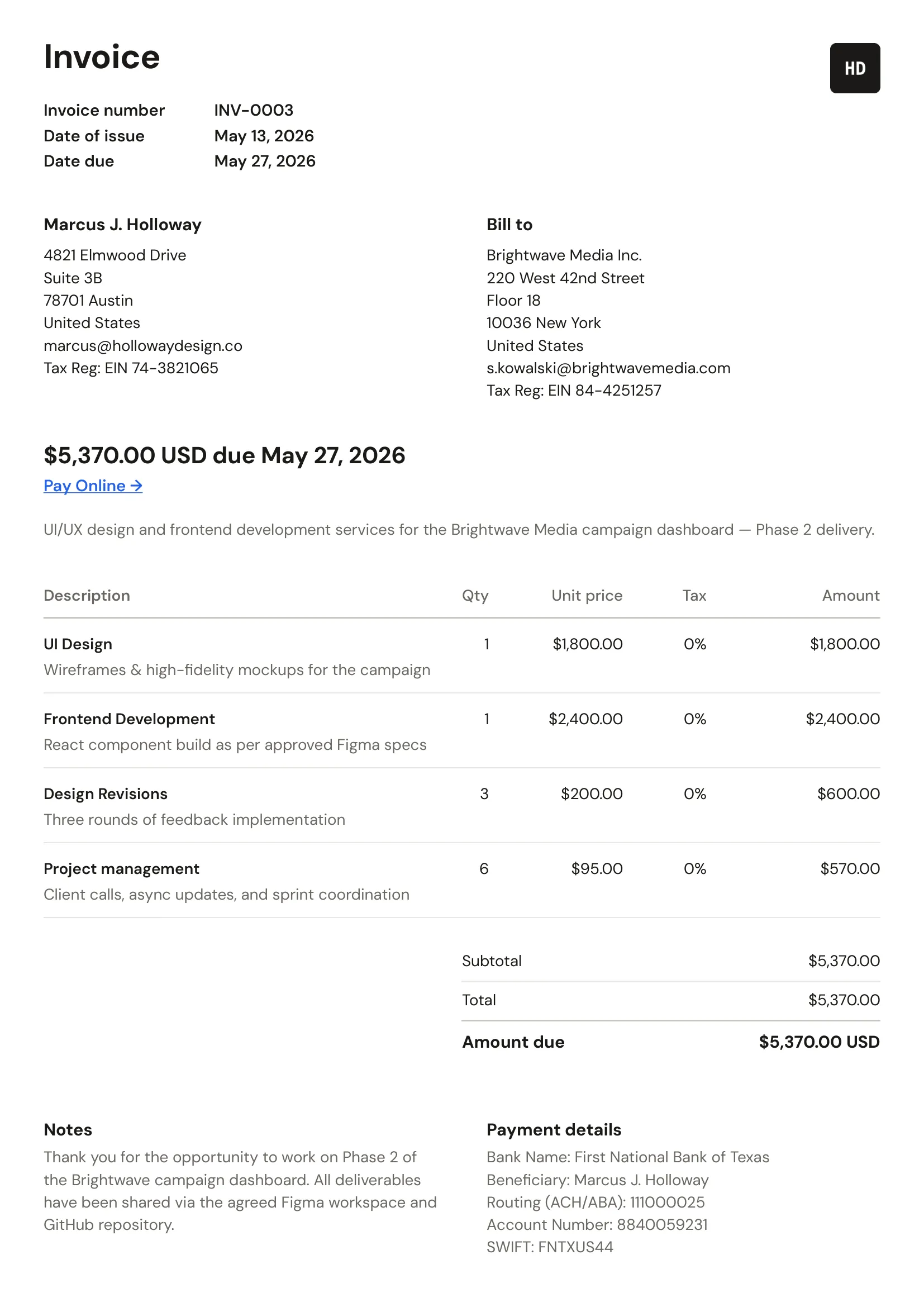
Clean, print-ready PDF invoices.
Invico generate beautiful PDF invoices and receipts that look like they came from a careful design studio, not a stock template. Every detail is crafted with professional typography, tabular numerals, and clean spacing.
- Real selectable text, not flattened images
- Beautiful, professionally crafted typography
- A4 or US Letter — portrait or landscape
What is included
Everything a professional invoice should contain.
A good invoice is more than a number and a total. Invico builds in the details that make your invoices look credible, get paid faster, and stay compliant with how most countries expect them to read.
Your business identity
- Company logo as a clean header image
- Business name, address, and contact details
- Tax or VAT number where required
- Bank details and payment instructions
Client information
- Billing address with company or individual toggle
- Country flag and dial code for phone numbers
- Per-client default currency
- Reusable client profiles you never retype
Line items and totals
- Itemized description, quantity, and unit price
- Per-line tax percentage with mixed rates supported
- Auto-calculated subtotal, tax, and grand total
- Tabular numerals so amounts always line up
Dates and identifiers
- Auto-generated invoice numbers like INV-0001
- Issue date and configurable due date
- Automatic Overdue status when due date passes
- Receipt numbers and payment dates on paid invoices
Payment and notes
- Pay-online link with Stripe or PayPal URL
- Custom notes per invoice with smart defaults
- Status pill: Draft, Sent, Paid, or Overdue
- Matching receipt PDF generated on payment
PDF output
- A4 or US Letter page size per invoice
- Portrait or landscape orientation
- Set defaults in settings, override per invoice
- Real selectable text, not a flattened image
Who it is for
Built for solo operators and small teams.
Invico is the right invoice generator if you bill clients directly, care how your documents look, and would rather not maintain another login for another SaaS dashboard.
Freelancers
Send clean, professional invoices to retainer clients and one-off projects without learning a billing platform.
Designers
Brand your invoices with your studio logo and let the clean, carefully crafted typography do the heavy lifting on every PDF.
Developers
Keyboard-first command palette, JSON backups, and zero account management. The invoice tool that respects your stack.
Photographers & creatives
Charge per shoot, per hour, or per deliverable. Add line items for prints, retouching, or licensing in seconds.
Consultants
Bill in any currency, attach payment instructions, and link a Stripe or PayPal pay button right inside the PDF.
Small businesses
Manage your client directory and keep clean records without committing to a monthly SaaS subscription.
Why Invico
Built differently from cloud invoicing tools.
Most online invoice generators are loss-leaders for a paid SaaS product. Invico is the opposite. It is a small, focused tool that quietly does its job and respects your time, your money, and your data.
Free forever
No subscription, no paywalled features, no upgrade nags. Invico is free because it has no backend, no database, and no per-user infrastructure. And that is not going to change.
Private by design
Your invoices, clients, and totals are stored in your browser, not in a database we own. There are no accounts, no tracking pixels, and only minimal anonymous analytics via Umami. We never collect personal data from your invoicing work.
Works offline
Invico is a Progressive Web App. Install it once and create invoices on a plane, on a train, or in any cafe with bad Wi-Fi. Your work is saved locally and waits for you.
Frequently asked questions.
Everything people ask before opening Invico for the first time.
Invico is a free invoice generator for freelancers and small businesses. It runs entirely in your browser — no signup, no subscription, no backend. You can create professional PDF invoices and receipts, manage a client directory, and track invoice statuses from draft through to paid. Everything is stored locally on your device and never sent to a server.
Yes. Invico is a free invoice builder with no paid tier, no premium features, and no time-limited trial. You can create and download as many invoices as you want at zero cost. There are no ads either.
No account required. Just open Invico in your browser and start. Your invoices and clients are stored locally on your device, not in a database we own. We do offer an optional product updates email if you want to be notified when new features ship, but it is opt-in and entirely separate from using the app.
Locally in your browser's IndexedDB. Your business details, clients, and invoices all live on your device. They never leave it unless you choose to export a backup.
Minimally and transparently. We use Umami, a cookieless, privacy-focused analytics tool, to count page visits and understand which features people use. No personal data, no fingerprinting, no cross-site tracking. Your invoice and client data never leaves your device.
Yes. Invico is a Progressive Web App. Install it from your browser and it works without an internet connection. Create invoices on a plane, in a cafe with bad Wi-Fi, or anywhere your laptop goes.
Yes. Settings then Backup gives you a single JSON file containing every setting, client, and invoice. Import it on any other device to restore the full state of your Invico.
Yes. Invico supports A4 and US Letter in both portrait and landscape. Set your preferred default in Settings and it will apply to all new invoices. You can still override it per invoice from the invoice editor.
Yes. Invico supports any ISO 4217 currency. Set a default currency per client so the right symbol shows up automatically when you start a new invoice.
Yes. Each line item supports its own tax percentage and Invico calculates the subtotal, tax, and grand total as you type. You can mix taxable and non-taxable items in the same invoice.
Yes. Settings then My Information lets you set a logo, business name, address, contact details, and bank information. Everything you save shows up on every invoice and receipt PDF.
Invoices move through Draft, Sent, Paid, and Overdue states. Mark an invoice Sent when you email it, and Invico automatically flips it to Overdue once its due date passes. Mark it Paid to generate a matching receipt.
Still have a question?
Email me directly and I will get back to you.